
I grew up in a small country called Wales, which is only the size of Wales. Over the last couple of years, I have probably seen more of it than I had managed in the previous 50. However, that has only served to make me realise how much more there still is to see. In a bid to at least partially address this, I have decided I am going to walk the Wales Coast Path.
Read moreNimbleosity v2.0
I think this title is in need of a little context. Back in 2009, I was introduced to the wonderful world of hybrid digital photography and filmmaking by the Canon 5D MkII. Over the next couple of years I built up my Canon system to the point where I didn’t enjoy carrying it. Many airlines seem to feel the same way when I tried to get it in cabin baggage. My solution was to change to Micro Four Thirds. I soon had a system that was as comprehensive as my Canon one but only half the bulk and weight. This was Nimbleosity v1.0. It seemed that I was all sorted but then along came Sony...
I had a big trip with New Zealand in 2014 planned with my grown up kids. This meant I could take a bit more gear. I was taking a Lumix GH4 as my main camera but persuaded myself that the A7S would be good for some low light activities I had planned. It wasn’t going to add much bulk as I only had the kit lens and a couple of old Zuiko primes to fit it. My daughter took charge of it for stills duties and I used it occasionallyfor video when the sun went down. Now the GH4 has many areas were it is a better camera than the A7S but there was just something about those full frame images that was undeniable. Hopefully you can see it in this little film I made on the A7S.
When (after what seemed about 5 minutes) Sony announced their MkII A7 series bodies, the A7Rii stood out for me. Here was a camera that seemed to combine the best features from my old 5D, Lumix and Olympus cameras while doubling resolution yet still in a compact body. I waited another 5 minutes to see if Sony brought out a Mark iii but they must have been on lunch break so I tool the plunge. It’s not a cheap camera and I had to trade-in so much gear I had to literally use a trolley to get it from the car park to the shop. Now some of you may already may all ready be thinking “Hold on a minute Andrew, haven’t you forgotten something quite important”. The truth is that, though the A7Rii has eaten a few less pies than the Canon 5D, there is still the small matter of physics, light and sensor size. Overall the body is not the biggest contributor to your backache or check-in arguments. How am I going to avoid being back where I started pre-nimble?
My Nimbleosity v2.0 plan is simple - it’s called Take Less Stuff. Those of you who know me will be sniggering at the moment because I am an Arch-packrat and have a Masters in Just-in-case. I am going to try and rely on the 2 P’s: pixels and percentage. If that fails I may try hypnotherapy. Playing percentage is a sporting term meaning to stick to the simpler shot until you have a high probability the more difficult shot will win the point. I have often carried 10Kg of gear around all day and only used 3Kg of it. So, niche gear stays at home unless niche is the main point of the shoot. Compared to anything I have used in recent years, the A7Rii has a prodigious number of pixels. This means I can afford to throw a few away without going backwards on image quality. If I use APS-C mode or crop images 1.5X I still have as many pixels as a Canon 7D or 1DX. Even going up to 2x I still have a similar pixel count to the A7S or LX100. This means that any lens I take has an effective doubling in range.

100% Crop

Original Image
Many people who shoot 4K video do so with no expectation of outputting in more than HD. They do this with a view to having the same option to crop in without losing image quality. Having internal 4K is a big advantage for the A7Rii over the A7S, but the A7Rii has an advantage over the GH4 too. This is a Sony technology called Clear Image. This is separate to the APS-C/Super 35 mode in video (which is the one recommended by Sony for best video quality) that already gives the option of a 1.5x crop. Clear Image is a digital teleconverter and on most cameras those should not be touched with a very long barge pole. However, in this case, Sony is doing some special magic behind the scenes which results in a very useable picture at a preset 1.4x or 2x crop. Clear Image works in 4K in both FF or APC mode, so you effectively have a choice of 1.4, 2 or 3x magnification. That’s even before you do any cropping in post.

Frame grab from 4K video with Clear Image off in Full Frame mode

Frame grab from the same spot but with Clear Image set to 2x and APS-C mode on giving effective 3X magnification
That’s a lot numbers to take in so lets think about it in lens terms. The Sony Zeiss 24-70mm F4 is premium midrange option in the Sony FE mount line up. Its compact and weighs in at a very reasonable 426g - only slightly more than my MFT equivalent. Without sacrificing resolution this is equivalent to a 24-135mm F4 on the A7s. The equivalent 12-35mm f2.8 MFT lens I owned was a faster lens but the A7rii is more than a stop better than the GH4 in low light and the depth of field advantage of FF over MFT is 2 stops. I can use crop mode and extend the range to 105mm and still have more resolution than the GH4. For 4K video, the 24-70 turns into a 24-210mm f4 by using different combinations in Clear Image. That’s enough to deal with most situations. Sony do have an actual 24-240 f3.5-6.3 in the line-up. I did consider this, especially after Trey Ratcliffe recommended it, but its bigger and bulkier and slower than f4 after 35mm. It’s that percentage thing again. This lens will be on the camera 90% of the time and I need it to work well for me in that main 24-70 range.
If I am travelling light, then then I can fit another 3/4 compact lenses in my small bag. These would be primes or a wider zoom. I have a bigger messenger bag or backpack which can swallow my Canon 70-200mm f4 if I need to go longer. Even then, I should still be well within what my ageing body will withstand never mind airline limits.
I am still experimenting with my new gear but if you want a great review of the Sony A7Rii then I recommend Cameralabs or Mirrorlessons. On nimble photography in general, The Digital Story is also a great resource. I have posted a few first pictures with the A7Rii in this gallery.
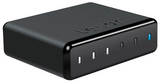
Lexar Workflow DD512 SSD
OK, I'll admit it - I am a little paranoid about backing up images when I am travelling. I probably take more precautions than many pros. In my defence, I quite often travel alone and the photographic record is my travelling companion. It is almost like that, if I lost it, it would be like I never went. So I am always on the lookout for new backup tools that make this job faster and more secure without adding a lot of weight.

Lexar Workflow Hub
I had already invested in the Lexar Workflow hub. I have the USB3 version but they also do it in Thunderbolt. The hub has 4 slots and you can buy different slot-in modules with different kinds of interface - I had the SD and XQD readers. The modules are also capable of being used as stand-alone reader as they have a USB3 slot which you can use with a cable.
Recently, Lexar added SSD modules in two different capacities: 256GB and 512GB. At first I didn't pay these too much attention as the price/performance at launch didn't appeal. However, I stumbled on the 512GB model for £105 (including VAT) which was much more attractive. The DD512 arrived formatted as exFAT which is a good option for cross system compatibility and large file handling.

At just 7cm x 6cm x 2cm the DD512 is very compact and, at 64g, very light. Can it really be as fast as a "proper" SSD? In truth, its not really as quick as the best 2.5in SATA drives. Its scores using the Blackmagic Disk Test were still very respectable at 354MBps read and 237MBps write.

To put this into perspective. I put this up against a 1TB Lacie Rugged drive which I have taken on previous trips. This is a traditional spinning disk and, with its plastic armour, runs in at a lardy 334g - five times the wight of the DD512 (but with twice the capacity). The ruggedness and the thunderbolt interface comes at a price too: £138 for the 1TB and £184 for the 2TB. Do you need the ruggedness? I told you about my paranoia right? An SSD has an immediate advantage being solid state. Do you need thunderbolt? I tested the Lacie with the Blackmagic Tester and found no real difference in speed. Using both interfaces the read speed was around 100MBps and the write speed about 95MBps. So thunderbolt is not really valuable for performance. It is really handy to have dual interfaces though. I use a MacBook Air 11in for travelling and this has no built in card reader. I typically will copy my cards to 2 different drives simultaneously using Shotput Pro and so I use one USB3 for the card reader and the other, plus the thunderbolt, for the target drives. If you have a Windows laptop or a built in reader you could save some cash sticking to USB3.

Using the Blackmagic benchmarks, the DD512 has a clear lead in performance and in dimensions. A spinning disk still wins on price per GB but the lead isn't as massive as it once was.
I decided to do some more real world tests. For this I did what I usually need to do in the field which is to copy cards. I used a card which contained 12.5GB of mixed media shot on the Sony A7s. This contains a nice mix of chunky video files and raw images along with the plethora of small files that XAVC seems to like to produce.
| Test | Time | MBps |
| Thunderbolt RAID to SD Card | 3m17s | 64 |
| Thunderbolt RAID to DD512 | 56s | 224 |
| SD Card to DD512 (Workflow Hub) | 2m22s | 89 |
| SD Card to DD512 (MacBook Air) | 2m22s | 89 |
| DD512 to SSD (MacBook Air) | 49s | 257 |
| DD512 to SSD (Mac Pro) | 37s | 340 |
| SD to Lacie HDD | 2m32s | 83 |
| Lacie HDD to SSD (Mac Pro) | 2m01s | 104 |
Let's analyse these results and try and add some perspective. The SD card is a Transcend SDXC UHS1 Class 3 card which claims 90MBps read and 60MBps write. My Blackmagic tests confirm this claim. The first test was just to copy the card image back from my fast RAID array onto the card. The card matched its claims in this real world test too. I did the same copy to the DD512 out of interest. Again it seems the Blackmagic tests are close to my real world scenario.
I copied the SD card onto the DD512 whilst both modules were in the hub. I then repeated this test with them connected into separate ports on the MacBook Air. Both tests scored 89MBps which is as fast as the card can read. There was certainly no evidence of using the hub causing any contention - at least not at this data rate.
The next tests are the kind of thing you need to do back at base, copying off onto your primary machine. For this I tried copying onto the Air's SSD and the more recent one in the Mac Pro. The Mac Pro managed the full speed predicted by Blackmagic, the Air couldn't quite keep up but is still pretty speedy.
Finally, it was the Lacie's turn. It was only slightly slower than the DD512 copying from the SD because the HDD write speed and SD read speed are similar. Back at base though and its going to take you over three times longer to off-load the footage. A full DD512 should take about 25 minutes to off-load against 82 minutes for the same data on the Lacie.
In Summary
For my own personal use case, I think the DD512 is a very good fit. I already have the hub and the modules are going to be much easier to travel with. In the triangle of performance, price and capacity they seem to be a good middle ground. I will probably pair it up with a tried and tested HDD like the Lacie for its first trip while it proves itself in the field.
You could argue that the SD card is the limiting factor and I am not really gaining much performance. The SD cards I use are top end cards but there are always some faster at the bleeding edge of performance at a hefty premium, This tends to trickle down with time. In the video field, 4K and RAW are pushing manufacturers onto newer platforms like XQD and Cfast 2. When you are chewing up cards at upwards of 60MBps the ability to backup these expensive cards and reuse them can be important.
The DD512 is also quick enough to be used as an edit drive being on a par with a dual drive RAID0 HDD for speed. If you were really confident in your ability to keep track of drives you could take the hub and build a mini RAID setup with something like Softraid. At some point I think USB3 would start to give you diminishing returns though!
Wide Angle Lens Shootout
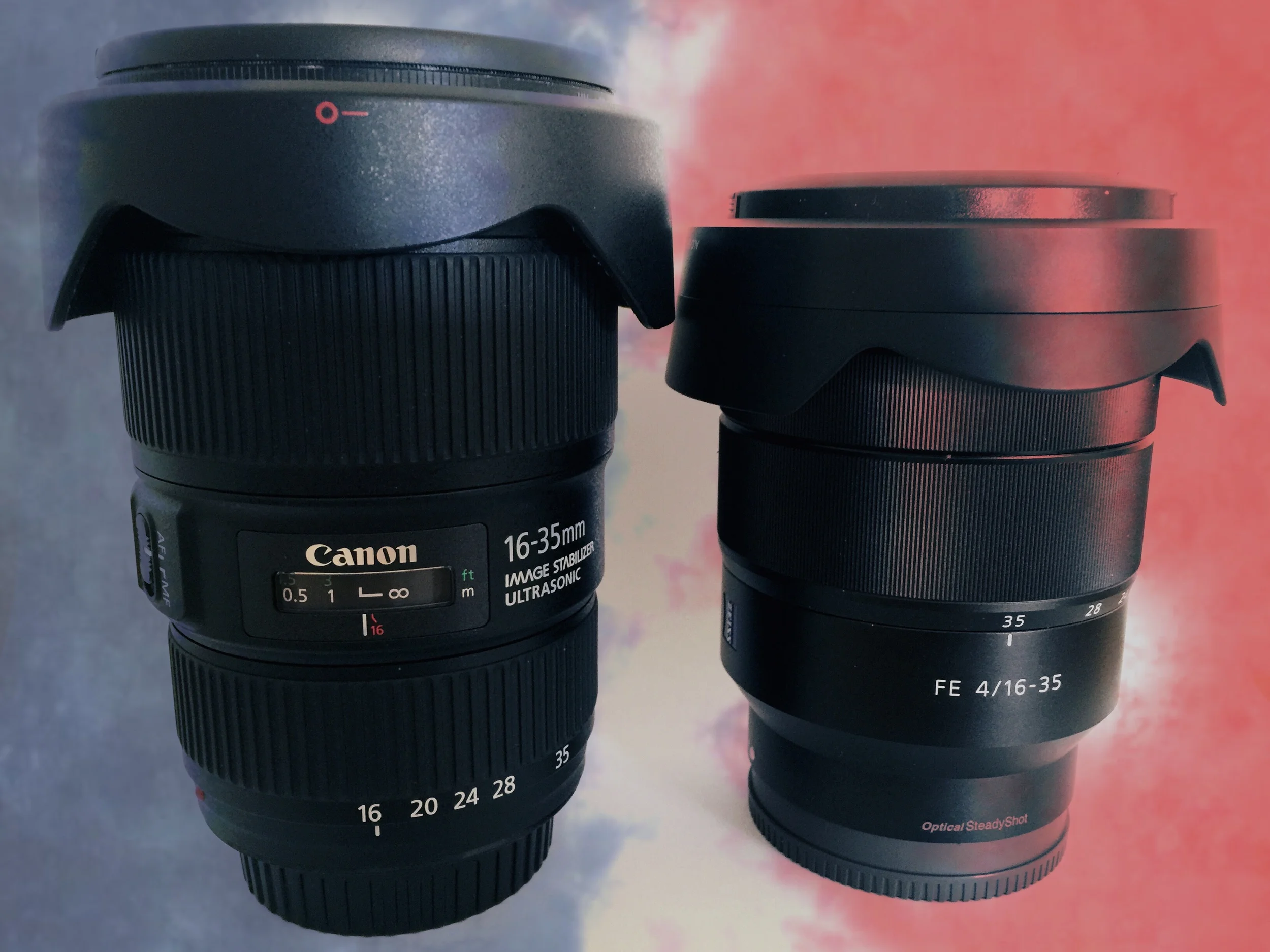
Canon in the blue corner, Sony in the red corner.
There is only so much you can do from reading specs and reviews. Even shows like the recent The Photography Show I attended can only give you a brief hands-on. In today’s mix and match world, few dealers are going to be able to replicate your own set-up. So the best way of getting some extended testing of a lens is to rent it. I make use of Hireacamera’s occasional special offers to try out lenses I am interested in.
Over the Easter weekend, I took the opportunity to try two lenses in a head to head challenge. When trying to compare two lenses, you need to set some terms of reference. The primary camera that I wish to use this lens with are Sony A7s. This is a full frame, mirrorless camera which has a strong bias towards video. By restricting the sensor to just 12 megapixels, Sony have made the A7s a low light and video master. I use the camera both for stills and video so any lens I use must be capable in both disciplines.
So what am I looking for? The A7s recently replaced a Canon 5D Mk2 in my fleet. This means that I don’t have many native Sony lenses yet. I do have a video camera which shares the same E mount but that has a crop sensor. I was still using Canon lenses with this camera with a Metabones adapter. This includes one of the Speedbooster type which restores the full frame field of view. So far I just have 2 e mount lenses. One is the FE 28-70mm f3.5-5.6 OSS and the other is the E 10-18mm f4 OSS. The first is a kit lens which I picked up cheaply as a stop gap for a trip to New Zealand. It turned out to be optically pretty good. Being slow is mostly an issue for depth of field control due to the A7s low light prowess. The 10-18 isn’t really designed for FF not being an FE lens. However, it will work on the A7s albeit with a reduced range of 12-16mm. This is seriously wide, which makes it more of a niche choice. So I have a gap at the moment in the range between 18 and 28. For video I can use the crop mode on the camera to turn this into a 16-28mm which bridges the gap to 28-70. Unfortunately, still in this mode are just 5MP which is getting a bit low these days when DSLRs are hitting 50MP and even my phone has 8MP. I also have the Canon EF 17-40mm f4L which does bridge the gap, but lacks image stabilisation which is useful for video even in wide angles. Any lens hoping to plug this gap needs to prove its worth over these incumbents.
So who are the contenders? First up is the new Sony Vario-Tessar T* FE 16-35mm F4 ZA OSS. This is a lot of name to live up to. This is a Zeiss branded lens and is a premium item with premium price tag. Sony have the market to themselves for native mount zooms at the moment. The only alternative is to buy another brand to convert. Given what I have already, it makes sense for that to be something with a Canon mount. So contender number 2 is the Canon EF 16-35mm f4L IS. This is also a new lens which is more compact (just) than the f2.8 but adds that all important stabilisation. At my local dealer the price as I write is £719 for the Canon and £1289 for the Sony

From left to right Sony 16-35, Canon 16-35, Canon 17-40 & Sony 28-70
So what do the specs tell us? Given that the Canon needs to adapted, we need to include the adapter for comparison. I am going to include my existing 17-40 too. With the adapters in place the Sony wins the size race pretty comprehensively. Unlike the Canon’s it does extend when zooming but, even when fully extended it is still the shortest of the three. It also has a more slight profile with a filter size of 72mm to the Canons’ 77mm. My scales clock the Sony at 606g. The adapter takes the 17-40mm past that to 648g. The already heavier Canon 16-35mm ends up 240g more than the Sony. So round one goes to the Sony.
Does the Sony sacrifice build quality in its compactness? Both the Canons are L lenses and their build quality reflects their pro status. Feel is good and the controls are smooth and linear. The Sony takes the build quality a step further though and does not disgrace the Zeiss badge on the side. There is a strong family resemblance to the Zeiss Loxia I tested last. The metal body and controls feel more upmarket than the Canons. The zoom ring has a more damped feel but the focus ring is quite loose but we will come back to focus later.
Despite winning the weigh-in with the Canons, the Tessar feels substantial on the A7s compared to the diminutive Loxia or the plastic 28-70. Its a good match in feel with the A7s. The 17-40mm is close enough in dimensions not to feel that different ergonomically. The Canon 16-35 feels substantially larger. The big front optics mean that the weight is near end of the lens and the extra length with the adapter does it no favours. That weight was enough to twist the camera on the tripod plate when I was shooting the tests.
Although the adapters do allow most of the functions of the Canon lens to work on the A7s there is a marked difference in their effectiveness. The AF on the Tessar is quick and direct. On the Canons its is slow and hunts noticeably with the 16-35 not always finding a lock. Switching to manual focus and the focus ring on the Tessar automatically activates the punch in which is a feature I enjoyed on the Loxia. This doesn’t happen and you have to punch in manually. All the lenses have a focus by wire system. The Canons do firm up at the end of their travel but will continue to turn if you push them. The Sony has no resistance at all and no indication of focus on the lens. There is a distance scale displayed on the screen. However, there is no linearity of response. This is a real set back for video use as its so unpredictable. Sony really need to offer some firmware to give the option of linear response but none of the FE lenses I have tried so far could be used with a follow focus. So the Canon’s finally win at something - not that I would trust their focus scales. This is one of the hardest nuts to crack for the hybrid shooter. The properties of a good AF lens and a good MF one are so opposite in nature.
Lens performance
I don’t have any tools for evaluating lenses quantifiably so I am basing my images based on eyeballing them in Lightroom. It’s also a little difficult to tell if the Sony has been given a little helping hand by the camera. I don’t believe so on the raw images but it’s a possibility.
At their smallest focal length and max aperture the two 16-35 lenses shine. They both have better control of vignetting and distortion and are noticeable sharper in the corners. The Canon is better with fall-off and the Sony with distortion and corner sharpness. Stopping down helps all the lenses but the Sony always holds a lead overall. At 24mm these lenses are in their sweet spot and impressive across the frame. The 17-40 is still a little more affected by vignetting wide open. At 35mm the Canon’s both have better corners than the Sony, especially wide open.
Overall, I would give this section to the Sony by a nose but mainly because its best at the wide-end and this is why you would use this lenses over a mid-range zoom. The Canon 16-35 has perhaps the most even breadth of abilities across focal length and aperture. The 17-40 struggles in some areas against the new boys but is still capable of great results if you keep away from 17mm and stop down.
In the field

I managed to get a couple of days shooting with the lenses. The first was a trip to the Chester Food Festival with my brother Paul and his mate Alex. I shot first with the Sony then with the Canon 16-35 and finally with the 17-40. The festival was busy and had a mix of interior and exterior locations. For run and gun photography like this the slow AF with the Canons was a killer. You really had to go manual or stick to more static scenes. The second day’s shoot was in a garden. I only took the Sony for this one as the weather started out foggy and I didn’t think I would get much. As it happened the sun decided to make a brief guest appearance.
I have put some of the pictures up in a gallery. The food festival pictures have been processed but the garden ones, with a couple of exceptions, only have the Lightroom lens correction applied. If you really want to pixel peep you can see the pictures in my Smugmug gallery.
Conclusion
The price premium for the Tessar is a not inconsiderable £570 over the Canon 16-35 which, by a strange coincidence, is the cost of a new 17-40mm. It also makes it more expensive than the faster f2.8 version Canon makes. By practically all measures, the Sony is a better lens on the A7s than the Canon. It is a fine lens with its only weakness being the manual focus problem that afflicts all FE lenses. If I had to buy the Metabones the price would be closer but I don’t.
For shooting stills only, the Sony is an easy winner in this test if you take price out of the equation. With a compact body like the A7s the EF adapters add size, AF lethargy and occasional glitches that are frustrating.
For video its a little less clear cut. If you are using MF and rigs those advantages are less pronounced. You also have to take into account that EF lenses will work with a huge range of cameras and can be used with speed-boosters on crop frames.
I am still left undecided on whether to purchase anything. I am not sure enough yet to spend the extra cash the Tessar requires. It's definitely made it onto the wish list though.
If I was still a Canon guy and I was buying afresh then I think the EF 16-35f4L IS is worth the extra over the EF 17-40mm f4L. Optically it is a step up but, given its size, you might want to throw the f2.8 version into the mix if stabilisation is not a priority for you.
Movember - this time its personal

I have been doing Movember for a few years now off and on. It was Philip Bloom whose campaigns brought this cause to my attention and I fundraise as part of his team. In previous years it was because I was convinced by the aims of Movember but it was still an abstract concept.
This year things are a bit different. My father’s PSA levels were high at his annual checkup at the beginning of this year. He was referred for further tests. This news hit us all hard, especially my Dad. Any mention of the big C is always scary. I thought it is worth telling our story for any who may face the same situation.
We had already hit the first problem with prostate cancer - diagnosis. The PSA test is not very conclusive. The doctors will talk about “cause for concern”. The PSA suggests that there might be an issue but a biopsy is required to confirm it. Even a biopsy is not a guaranteed indicator. This is because the process of acquiring the sample is not just a sample in the medical sense but also in the statistical sense. If the sample is taken from an infected area then you can have reasonable certainty that you require treatment. However, if it doesn’t then you don’t know if you are clear or whether the biopsy just missed an infected area.
There was a touch of serendipity in our case. A few weeks before my father had his news I was listening to the radio when a story came on about prostate cancer. I am not a big fan of medical stories but, on this occasion, I kept listening because of my experience with Movember. The program was talking about a new diagnosis technique involving using an MRI scan to target areas on the prostate that looked more likely to be infected. This has the added advantage that it looks at the prostate more holistically, where as the traditional biopsy is limited by the angle of entry.
I told my father about this so he had the opportunity to ask his specialist about it. The specialist was familiar with this approach but it is still regarded as experimental in the UK so is not done under the NHS.
My father’s MRI scan showed some areas which were “cause for concern” so a multi-parametric biopsy was set based on the MRI results. The biopsy was supposed to be an overnight stay in hospital, mainly so my Dad had support for getting used to the catheter required. In the end it turned out to be a fair bit longer than that due to some conflicts with some of my Dad’s existing medications and some over-hydration. Once my father was home there was nothing to do but wait for the results come through. Even this isn’t a black and white decision. The doctors classify the result in terms of risk. Much of what they found was either clear or low risk. There was one patch that was classified as medium risk and therefore “cause for concern”. My father was given four options. The first was to leave things alone and monitor the levels. The second option was radio therapy. The third was surgery on the prostate. The final option, and the one my father elected to follow, was a high intensity ultrasound treatment.
This meant another trip back to hospital for an overnight stay. Fortunately, we were much better prepared with the medications this time and everything went to plan and my Dad was back out on schedule. So the actual treatment proved easier than the biopsy and was as a simple as you could hope when there is a catheter involved.
Several weeks following the treatment, Dad had to have another MRI scan to check for progress. These all came back positive. The final stage followed later and that was a retest of the PSA levels. I am glad to report that these had dropped considerably and my father’s specialist was delighted with the results.
Of course, we will never know what the outcomes would have been if we had taken different treatment choices down the line but we are very happy with the outcome we had. I like to think that Movember had a little part to play in the chain of events that informed our journey. We would also like to thank all the staff at Yale Hospital Wrexham who were involved in my father’s treatment.
Our advice to anyone who finds themselves on a similar path is to talk to your doctors and make sure you are well informed on the treatments available to you. Also to take comfort in our story that you can have a positive outcome especially if you get an early diagnosis. It is for this reason I will continue to work for Movember for its work in raising awareness in the need to get tested.
The tache below is a link to my Movember page. Please donate for this very worthy cause.

As part of Team Bloom 'Tache you can enter Phil's competition where there are some brilliant prizes for the filmmaker or photographer in your life. If you don't have one then there is always me ;) Follow this link to see the competition rules and don't wait too long. I don't mind if you donate through me or directly as long as Movember gets the benefit.
